



New Character Pages, Story-Style Memories and 30 Profile Icons
Characters get new pages and a new window with all their images, memories now read like stories, and every theme has its own page. Pick one of 30 Flirtzy profile icons, find your own characters with search, sort and filters, report anything that breaks the rules, and enjoy faster chats and galleries.
01Character pages
A new home for every character
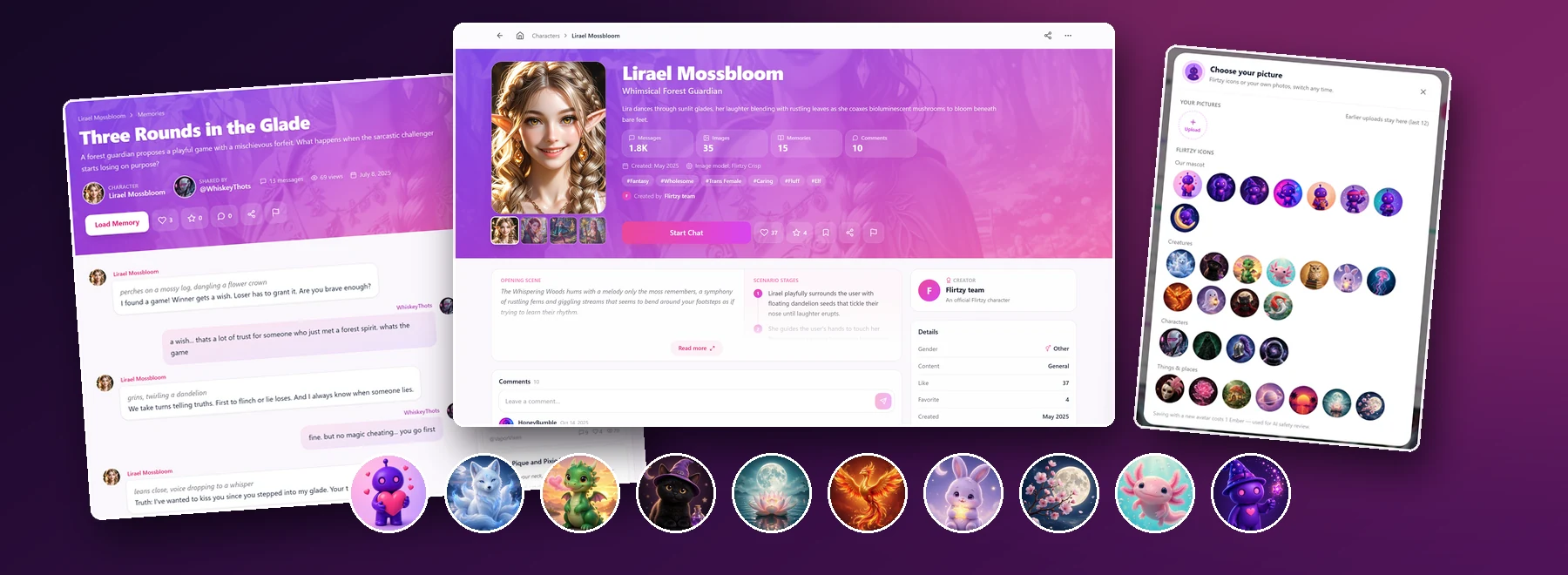
Every character now has a page worth sharing. A wide, colourful banner shows all of the character's pictures: switch between them, or tap one to see it full screen. Big numbers tell you at a glance how many messages, images, memories and comments it has, and its tags take you straight to everything else in that theme. Start Chat, Like, Favourite, Save, Share and Report sit right under the picture.
Links you can read
Character pages now have addresses like flirtzy.ai/character/lirael-mossbloom-whimsical-forest-guardian-20, and memories like flirtzy.ai/memory/three-rounds-in-the-glade-…. You can tell what a link is before you open it. Old links keep working and take you to the new address.
Opening scene
Read how the story begins, next to the scenario's stages, before you start a chat.
All the images
The character's images in a grid, newest or oldest first, with See all for the full collection.
Public memories
Stories other members shared with this character, a tap away.
Comments
What people say about the character, with replies and the authors' profiles one tap away.
Creator & details
Who made it, plus gender, content rating, likes, favourites, creation date and default image model.
Similar characters
Characters like this one, so you always know where to go next.
02Character window
The character window, rebuilt from scratch
Tap any character card and its window opens right where you are, with everything from the character page: the banner, the images, public memories, comments, the creator and similar characters. Like, favourite, save and share without leaving the list you were browsing.
- Creators get proper credit: their bio, how many messages their characters received, and their other characters in a row you can drag through.
- The opening scene and memory previews look just like the chat.
- Open another character from inside the window, then go back and forward between them. Your browser's Back button brings the window back too.
- Shows the character's default image model and when it was last edited.
03Character galleries
Every image of a character, in one place
See all opens every image of the character in one window. Search titles, descriptions and prompts, show only the images from a certain source, and sort them the way you like. Many characters' newer images were missing from their gallery before (some even showed "no images yet"); now every image is listed, and the counts on the cards match what you can scroll through.
Search
Find an image by its title, description or prompt.
Filter by source
Character pictures, images from chats, the image creator, or memories.
Sort
Newest, oldest or random.
Fast with any size
Opens and scrolls quickly even with hundreds of images; only what is on screen is downloaded, with no white flashes.
Loads as you scroll
No more "Load more" button, and no big gaps between the columns.
Back where you were
Open a gallery from an image, close it, and you are back at that image. Esc closes only the window on top.
04Images
A smarter image window
Open any image to see it big, with its details beside it. The image window now shows the prompt of chat images and character pictures too, wherever it was saved, and lets you download the size you need. Below, Images in this feed shows what comes before and after the current image: Global follows the feed you came from, Character shows this character's own images, and the arrows follow the tab you picked.
- Swipe or drag between images with a finger or the mouse; the mouse wheel works too. The next image slides in right beside the current one and glides into place without a flash.
- The big preview of a related image opens only when you point at it, not while you scroll.
- Arrow keys no longer move the image behind a profile or another window.
05Memories
Memories read like stories
Shared memories have a brand-new page. A colourful header shows the title, the character and who shared it, with the number of messages and views. The chat itself is laid out like a book of messages that is easy to follow, and pictures open full screen. Comments sit right under the story, and more memories with the same character wait beside it.
06Tag pages
Find characters by theme
Every character tag now has its own page, like Fantasy, Elf or Anime, with all of that theme's characters, the usual sorting and filters, and related tags to explore next. The new Character tags page lists every theme with how many characters it has. Tags on character pages and in the character window are now links too.
07Profiles
Your profile: 30 Flirtzy icons
No photo you want to use? Pick one of 30 ready-made Flirtzy icons: our mascot in eight moods, creatures, characters and dreamy places. Tap your picture on your profile, or open Edit Profile, and choose. It changes right away.
Your own photos are kept too
Pictures you upload stay in Your pictures (your last 12), so you can switch back to an earlier photo any time, without uploading or paying again. Only a brand-new upload costs 1 Ember, which covers its safety review.
08My characters
Find your own characters in seconds
Made a lot of characters? My characters on your profile now has a toolbar. Search looks at everything about a character (its name first, then its role, story and tags), and you can sort and filter the list. Each option shows how many of your characters it has, and the number that match is always in view. The same toolbar is on the characters in your Favourites and Likes.
| Sort by | What comes first |
|---|---|
| Newest | The characters you made most recently |
| Oldest | Your first characters |
| Recently updated | The ones you edited last |
| Popular | The most popular ones |
| Most chats | The ones with the most messages |
| Most liked | The ones with the most likes |
| Name (A–Z) | Alphabetical |
09Safety
Report anything that breaks the rules
You can now report characters, images, memories, comments and members. Each has its own list of reasons, and you can add a short note. Our team reviews every report.
- 1
Tap Report
On a character, image, memory, comment or profile, look for the flag.
- 2
Pick a reason
Choose what is wrong and add a note if it helps us understand.
- 3
We review it
Our team checks every report and acts on what breaks the rules.
Fair for everyone
Reporting needs a signed-in account, and there are limits on how often you can report, so the feature cannot be used to harass anyone.
10Chat
Chats that start faster and look better
Starting a chat with some characters used to take 15–20 seconds; now it is instant. The images in a character's first message use the full width of the message, and you can open them full screen like any other image in the chat (the full-screen view no longer sits under the side menu). And a reply that is still being written now survives a page reload or a dropped connection: it keeps appearing in place.
Instant
chat start, even with characters that took 15–20 s
30
Flirtzy profile icons
5
kinds of content you can report
18
languages, each with its own address
11Gallery
An endless, faster gallery
Endless scrolling
The gallery keeps loading as you scroll, with no "Load more" button, and new images are ready before you reach the bottom.
Search characters
Type in the featured characters bar to find any character with images by name, role, description, style or tag.
Hide it once
Hide the featured characters bar and it stays hidden next time.
Cleaner cards
The featured cards' name, role and stats take up much less of the picture.
12Languages
Your language, in the address
Once you pick a language, pages open at that language's address, like flirtzy.ai/tr/… or flirtzy.ai/de/…. Links you share open in the same language for your friends.
13New versions
Never miss an update
When a new version of Flirtzy is out, a small card with our mascot lets you know. Refresh when it suits you, or tap Later; nothing reloads on its own, so you never lose a message you are typing.
14Polish
And a few more improvements
- ImprovedPublic profiles show the member's memories first, and a profile with damaged data no longer fails to load.
- ImprovedComment authors' names now link to their profiles, and the old emoji and text icons on character and memory pages are proper icons.
- ImprovedOn character cards, the hover panel shows the character's gender as a symbol instead of cut-off text.
- ImprovedCharacter galleries open fast however many images they have: the header arrives together with the images, and Oldest first sorting works.
- NewThe banner above the characters on the homepage can show several announcements in turn: it moves on by itself, and you can tap the dots or swipe to switch.
- FixedCharacters whose newest images were missing from their gallery, or that showed "no images yet", now list every image.
- FixedThe full-screen image view in chats no longer sits under the side menu.
15
Questions
New Character Pages, Story-Style Memories and 30 Profile Icons
Characters get new pages and a new window with all their images, memories now read like stories, and every theme has its own page. Pick one of 30 Flirtzy profile icons, find your own characters with search, sort and filters, report anything that breaks the rules, and enjoy faster chats and galleries.
What do you think?
 Adults only · 18+
Are you 18 or older?
Flirtzy is an AI companion platform with adult content, including sexually explicit material. You must be at least 18 years old, or the age of majority where you live, to enter.
By entering, you confirm you're of legal age and agree to our Terms of Service and Privacy Policy.