
Character Creation Overhaul, Chat & Gallery Improvements
Character creation is now fully independent of your device and connection, with live progress you can check anytime, plus a redesigned page, a new generations history, smarter notifications, and a long list of chat and gallery fixes.
Character Creation Is Now Fully Independent of Your Device
Character generation previously ran tied to your active browser session — a dropped connection, a sleeping device, or navigating away at the wrong moment could cause a generation to fail outright, stall indefinitely, or never complete at all. That entire class of problem has been eliminated.
- Character creation now runs entirely on our servers, independent of your device or connection
- Close the tab, lock your phone, or walk away entirely mid-generation — it keeps working and finishes on its own
- Come back at any point — seconds, minutes, or hours later — and your character will be ready and waiting
If a generation ever does fail — due to a temporary service issue on our end — you'll see a clear, honest explanation of what happened rather than a confusing technical error message, along with a one-click Retry option and the ability to dismiss it quietly if you'd rather move on.
Faster, Smoother, and More Transparent Generation
On top of no longer being tied to your session, character generation is now noticeably faster and far more reliable end to end. Some users were previously getting stuck partway through the process — the initial character draft in particular could occasionally take far too long to come back, leaving the creation flow feeling stalled or unresponsive right when it mattered most. We've tracked down and fixed several underlying causes of this, and the whole pipeline has been hardened against temporary service hiccups with automatic graceful retries behind the scenes. You'll also see live, real-time progress as your character comes together — its name and personality appearing as soon as they're written, and each image appearing individually the moment it's ready, not all at once at the very end.
We've also refined how re-generating works: since every AI generation is naturally a little different, choosing to generate again with the same settings now always gives you a genuinely fresh result, instead of occasionally being shown an old attempt.
New: Generations History, Right on the Navigation Bar
A brand new Generations menu now lives in the top navigation bar, accessible from anywhere on the site — not just the character creation page.
- New Generations icon in the top navigation bar, accessible from anywhere on the site — not limited to the character creation page
- See every active and recently completed generation at a glance, with thumbnails, names, and live progress bars for anything still running
- Click any finished character to instantly open a rich preview — gallery, opening scene, story, and personality — without leaving the page you're on
- A live badge on the icon shows how many generations are currently running or newly finished
- On mobile, the menu opens as a clean bottom sheet rather than a cramped dropdown
Notifications — New Alerts & a Proper Unread Badge
Notifications previously existed for things like likes, comments, and follows — but finishing a character generation never triggered one. That's now changed: you'll receive a real notification the moment a character you're creating finishes.
- New: a notification now fires the instant your character finishes generating — this didn't happen before at all
- Fixed: the notification bell previously gave no indication of how many unread notifications you had — you had to open the panel just to check. It now shows a proper unread count badge (+1, +5, etc.) at a glance, clearing automatically once you open it
The Character Creation Page, Fully Redesigned
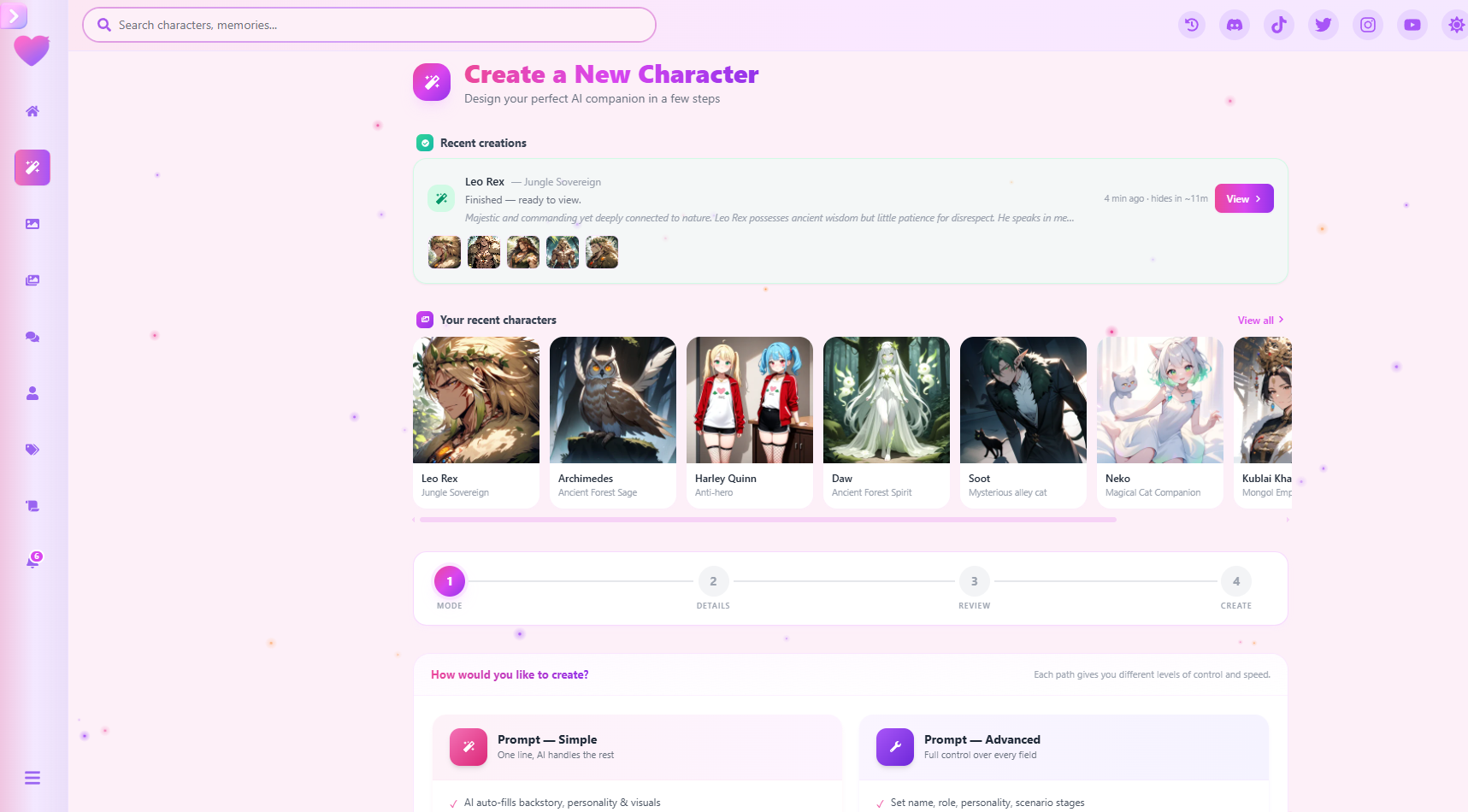
The entire character creation experience has received a genuine top-to-bottom visual redesign — spacing, layout, colors, and shapes have all been reworked across every single step of the flow, for a noticeably more modern and pleasant feel from the moment you land on the page through to your finished character.
- "Your recent characters" strip added directly to the creation page — draggable, arrow-key navigable, browse what you've made without leaving the page
- "View all" opens a full searchable, paginated gallery of every character you own
- Clicking any character — from the strip, the full gallery, or the Generations menu — opens the same rich detail preview: full image gallery with a rotating hero shot, opening scene rendered exactly as it would appear in chat (including intro images), scenario stages, story, personality, and a full breakdown of the exact settings used to generate it
- Direct "Start Chat" button right from the preview — jump straight into a conversation with your new character
- One-click "Create Another" button once a character is ready, resetting straight back to step one with no extra navigation
- Step indicator, mode selection cards, and every panel on the page redesigned with a cleaner, more consistent visual language
Mobile has received particular attention this update — every part of the character creation flow has been substantially compressed and reorganized for phones and smaller screens, with desktop left fully unchanged.
- Mode selection cards now sit in a clean 2×2 grid on mobile instead of stacking vertically one by one
- Step indicator (Mode → Details → Review → Create) compressed to smaller circles, showing the current step's label only, saving significant vertical space
- Recent characters strip and continuing-generations panel both shrunk and capped in height for mobile, with a redesigned compact card layout
- Tag selection now opens as a proper bottom-sheet panel instead of a long, unbroken tag cloud you had to scroll through
- Image upload area and copy rewritten for touch — "Tap to add photos" replaces "Drag & drop," which never applied to mobile in the first place
- Back/Continue navigation buttons now stay fixed to the bottom of the screen on mobile, always reachable no matter how far down the page you've scrolled
Accurate, Clearer Credit Costs
- Estimated credit cost shown before creating a character is now pulled live and always kept accurate to current pricing
- Section visually refreshed with a clearer layout and a new icon
- Confirmation step now uses a proper animated on/off switch in place of the old plain checkbox
Character Summary Export Fixed
The "Download PNG" and "Download PDF" buttons on a finished character's summary screen had a bug causing exports to occasionally show duplicated or missing images, and longer characters could get cut off entirely in the PDF. Both issues are now fully fixed — exports are complete, accurate, and properly paginated across multiple pages when needed.
Chat Experience Improvements
A number of quality-of-life improvements have landed in chat this update:
- Copy button added to every message, letting you copy any reply with a single click
- Message text can be properly selected and highlighted again
- Fixed formatting issues where streamed messages could occasionally break mid-reply on action or thought blocks
- Fixed an issue where messages streaming in could feel "stuck," making it hard to scroll away or interact with the page while a reply was still being written
- Minimum reply length increased, reducing how often replies get cut short
- New: a clear notice now appears if a reply looks like it was truncated, so it's obvious what happened instead of a reply just quietly ending early
- The "Continue" feature — letting your character keep going on their own without your input — has a clearer description and a more polished, animated button
- Fixed a mobile display bug that could leave blank space at the bottom of the chat screen on certain devices
Gallery Improvements
- Fixed a bug that was causing some users to hit unnecessary rate limits while browsing the gallery — browsing should now feel noticeably more open and unrestricted for everyone
- Fixed a bug causing the entire gallery to needlessly reload every time an image was opened
- Fixed an issue where some newly generated character images weren't properly appearing in that character's own image gallery afterward
## Media Modal — Rebuilt Image Viewer The image viewer (the modal that opens when you click into a photo) has been substantially rebuilt. Previously, switching between images could feel clumsy — occasional resizing hitches and inconsistent animations made browsing feel a little rough around the edges. That's now been replaced with a genuinely smooth, relaxed experience from end to end.
- The old crossfade transition has been fully replaced with a directional slide animation — the current image slides out while the next one slides smoothly in from the opposite direction
- A subtle shine sweep plays across the image while the next one is loading, replaced instantly once it's ready — if an image is already preloaded, the whole transition fires immediately with no visible loading step at all
- Neighboring images now preload quietly in the background as you browse, so moving between photos feels near-instant
- New drag-to-navigate gesture — swipe an image left or right to move between photos, with a live preview peeking in from the edge as you drag
- Tap an image to zoom in exactly where you tapped, anchored precisely to your click point; tap again to zoom back out
- A one-time hint introduces the new drag gesture the first time you open the viewer, so the gesture is easy to discover
- New "Animations on/off" toggle for anyone who prefers instant, no-frills image switching — your preference is remembered across visits
★ Character creation is now fully server-side and independent of your device or connection — start a generation, close the tab, and come back whenever you like. Combined with the new Generations menu, live progress streaming, and a fully redesigned mobile experience, this is our most substantial character creation update yet.
คุณคิดอย่างไร?